
How to play
Nirmaan opens in your browser - no download, no account. Tap Play, give your character a name and look, and you're in your own world.
On a phone
| To | Do this |
|---|---|
| Walk | Left thumb on the round pad - push it to the edge to run |
| Look round | Drag anywhere on the right |
| Jump | The ▲ button - tap it twice quickly to fly |
| Break a block | Hold your finger on it |
| Place a block | Tap where it should go |
| Your bag | The last slot of the bar at the bottom |
Turn your phone sideways. Full screen is in Settings, Graphics.
On a laptop
| To | Press |
|---|---|
| Walk | WASD - tap W twice to run |
| Look round | Move the mouse (click the game first) |
| Jump / fly | Space - F turns flying on and off |
| Break / place | Left click / right click |
| Pick from the bar | 1 to 9, or the mouse wheel |
| Your bag and crafting | E |
| The guide | H - quests are on B |
| Festival jobs and the stall | J |
| Camera | V or F5 |
| Menu | Esc |
Your first ten minutes
- Break a tree. Hold on the trunk until it pops - wood goes into your bag.
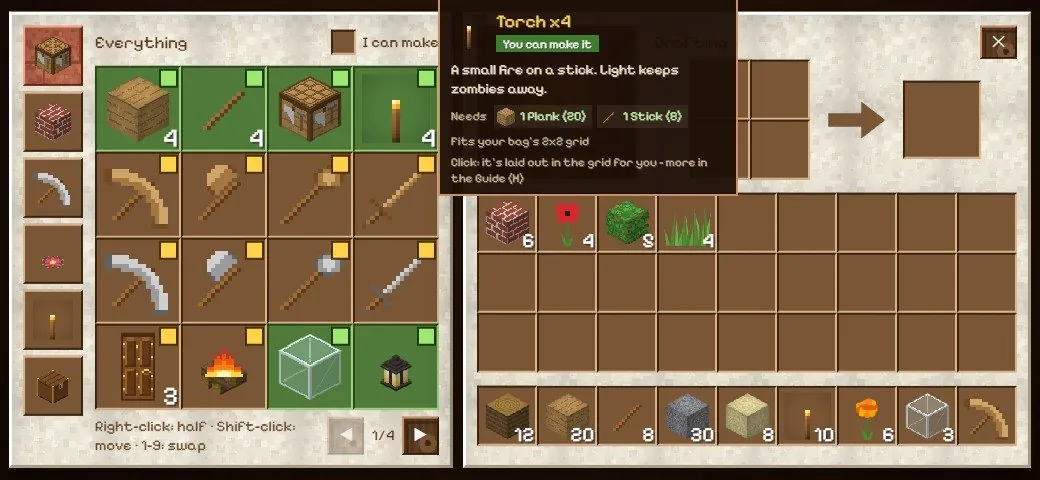
- Make planks and sticks. Open your bag: one wood makes four planks, two planks make four sticks.
- Make a crafting table. Four planks in a square. Place it and use it for bigger things.
- Make a wooden pickaxe, then dig stone for stone tools - each tool breaks its own kind of block faster.
- Make torches before night: a plank on a stick. Light spreads, so your home stays bright.
- Open the guide any time: every block, how to make it, and quests to try.
Play with friends
Open the menu, tap Friends, then Invite friends and share the link - or tell them your 6-letter room code. Up to 6 players can build together, and voice chat is there if you switch your microphone on. Friends need the internet; playing alone works offline.
Put it on your home screen
- Android: tap Install app on the game's first screen (it's also in Settings, World). Nirmaan opens full screen and works without the internet.
- iPhone and iPad: in Safari or Chrome, tap Share, then Add to Home Screen. That's the only way to get full screen on an iPhone.
- Laptop: Chrome and Edge show an install button in the address bar.